Everything you need for smarter electrification — in one product

ePOP Concept

Build electrification cases in hours with ePOP’s physics-based platform.

ePOP Pro

Find the best fit through detailed models and real-time insights.

Benchmarking

Turn complex simulations into clear visuals that align results with KPIs.

Unified value proposition

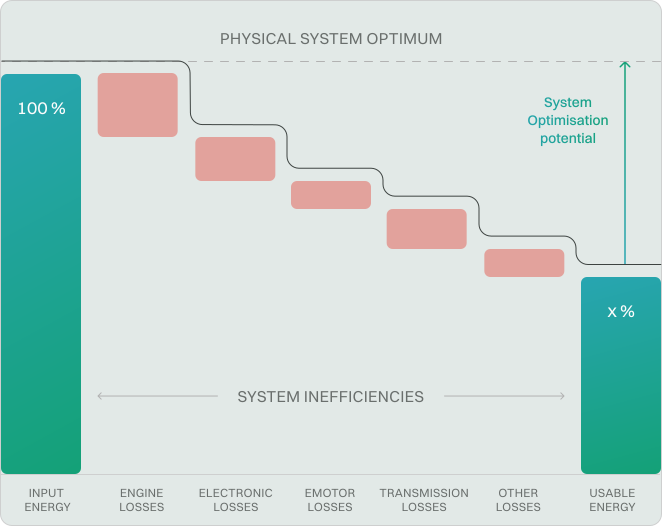
We’re all about optimizing system losses component 
to system integration

The concept phase

Use ePOP in engineering - from concept exploration to component specification

1-4

ePOP can display data from benchmark measurements side-by-side with the concepts being explored, allowing teams to easily compare performance metrics.

ePOP has frequently used system level architectures built-in to allow rapid investigations without the need to build models from scratch.

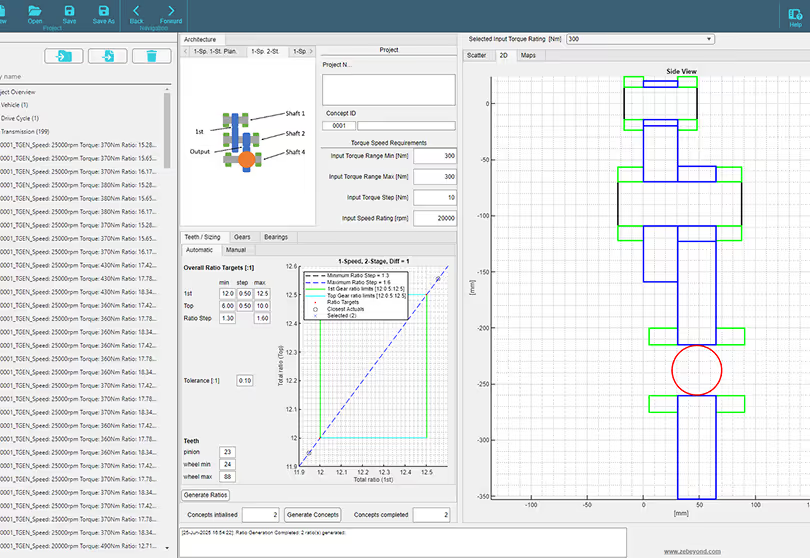
ePOP enables creating, importing, and viewing components in isolation — and combining many into system-level solutions for design exploration.

In its component models, ePOP allows higher fidelity to include detailed design choices (such as material selection) very early in the concepting phase.

Concept exploration
Acceptance test
Product maintenance
System verification
Component integration

Product suite

All-in-one product - three ways 
to power your work

01
Overview

Evaluate tens of thousands of architecture combinations against your actual mission requirements – in hours, not months

Load your operational duty cycle at millisecond resolution. Compare series hybrid, parallel hybrid, fully electric, ICE, and hydrogen fuel cell configurations simultaneously – across mass, volume, exportable power, range, and whole-life cost. ePOP Concept uses a zero-dimensional, first-principles model, correlating to within 10% of real-world hardware. Operational in under a day, no specialist simulation background required.
  • Physics-based accuracy: correlates to within 10% of real hardware
  • Full architecture comparison: ICE, hybrid-electric, fully electric, hydrogen fuel cell
  • Operational in under a day: cloud-based, no infrastructure requirement
02
Workflow

How it works - key steps

Individual Function Cycle

  • Load in different functional cycles (with millisecond resolution)
  • Tag each segment as Electrical direct, Hydraulic direct, or Mechanical
  • Combine cycles into a single consolidated duty profile
  • Browse power delivery scenarios
  • Import cycles from a spreadsheet
Individual Function Cycle

Library

  • Use a baseline component library (inverters, motors, ICEs, fuel systems, batteries, chargers, transmissions, hydraulic pumps/motors)
  • Define and load your own custom components (beyond the built-in ones)
Library

Configuration

  • Select components from the library
  • Build and compare two powertrain scenarios
  • Choose the architecture (parallel, series, etc.) and power sources
  • Perform sweeps to find optimal architecture
  • Set operation parameters: number of cycles, years, cost assumptions
Configuration

Results

  • Determine the optimal level of electrification based on the cycle, budget, and horizon
  • Detailed KPI breakdowns by component (cost, mass, etc.)
  • Compare lifetime fuel usage (ICE vs hybrid vs fully electric)
  • Export a “shopping list” specification for the optimal powertrain setup
Results
03
Key capabilities

Behind the solution - main functions

High-fidelity cycle modelling

Comprehensive component and architecture library

Architecture comparison & optimization

Insightful output and decision support

04
Case studies

Practical examples and proven results

ePOP Concept
Defense & Aerospace

Assessing Hybridisation Pathways for Legacy Fleet of General Service 4x4 vehicles

Read case study
ePOP Concept
Defense & Aerospace

Double the flight duration of a battery powered eVTOL

Read case study
ePOP Pro
Automotive & CV

Proving the SMC Value Proposition for a High-Volume eMotor

Read case study
ePOP Pro
Automotive & CV

High Speed Motor Evaluation for Next-Gen 4WD SUVs with ePOP

Read case study
01
Overview

Full 1D dynamic simulation: the right depth of analysis at the right stage of the programme

ePOP Pro extends to full speed-torque analysis, system-to-component loss iteration, and detailed efficiency maps with engine BSFC data. Cross-validated against benchmark CAE tools to within 1%. The appropriate tool for system specification level – not a simplified alternative to detailed design tools, but the right tool for the concept phase before those tools are applicable.

  • Full spectrum speed-torque analysis and component combination
  • Greater than 90% system efficiency achievable through subsystem alignment
02
Workflow

How it works - key steps

Setup component library

  • Import or select components: motors, engines, transmissions, inverters, batteries
  • Add or generate custom component definitions
Setup component library

Requirements analysis

  • Define system-level requirements: torque, speed, vehicle specs
  • Input duty cycles, speed profiles, power & packaging constraints
  • Include attributes such as emissions, sustainability goals
Requirements analysis

Powertrain configuration

  • Select powertrain architecture: BEV, HEV (parallel/series), ICE hybrid
  • Choose drivetrain layouts: RWD, AWD, FWD, dual/single motor
  • Configure component combinations
Powertrain configuration

Design space exploration

  • Generate many candidate configurations
  • Vary parameters, combine architectures & components
  • Evaluate across metrics and KPIs
Design space exploration

Shortlisting & decision

  • Rank and compare configurations
  • Identify the optimal design(s) that best meet performance, cost, sustainability
  • Select the winner(s) for further development
Shortlisting & decision
03
Key capabilities

Behind the solution - main functions

Component generation library

System-level loss & efficiency modelling

Trade-off exploration

Custom powertrain configuration

04
Case studies

Practical examples and proven results

ePOP Concept
Defense & Aerospace

Serial Hybrid for a Tracked Vehicle

Read case study
ePOP Concept
Defense & Aerospace

ICE / BEV / Hybrid Scenarios for 8×8 Vehicle

Read case study
ePOP Concept
Defense & Aerospace

Double the flight duration of a battery powered eVTOL

Read case study
ePOP Concept
Defense & Aerospace

Assessing Hybridisation Pathways for Legacy Fleet of General Service 4x4 vehicles

Read case study
01
Overview

Every result traceable to defined inputs and validated physics: formatted for programme governance

Verified loss maps and thermal data from more than 150 production vehicle platforms, including reverse-engineered motor models. When you are evaluating a motor type or architecture, you are working from validated performance data – not a manufacturer’s datasheet. Outputs are formatted for configuration review boards, procurement justification, and stakeholder reporting: results that can be challenged, which means they can also be defended.

  • Verified data from 150+ production platforms
  • Results traceable to inputs and physics; auditable at every level
  • Outputs formatted for management reviews, procurement boards, and programme documentation
02
Workflow

How it works - key steps

Access powertrain & component database

  • Leverage the xEV component library: motors, inverters, transmissions, batteries & EDUs drawn from ~150+ vehicles
  • Upload your own component data if needed
Access powertrain & component database

Simulate & benchmark virtually

  • Use the ZeBeyond simulation engine to model performance & efficiency of powertrain(s) in a virtual environment
  • Compare your design against competitor data side-by-side
Simulate & benchmark virtually

Explore & analyze insights

  • Visualize metrics: cost, CO₂, efficiency, power density, torque density, etc.
  • Drill into component and system KPIs to see where improvements are possible
Explore & analyze insights

Make data-driven decisions & export specs

  • Identify gaps vs competition and optimize your architecture
  • Generate spec outputs or configurations ready for implementation
Make data-driven decisions & export specs
03
Key capabilities

Behind the solution - main functions

Comprehensive xEV component library

Virtual competitive benchmarking

Contextualized insights & metrics

Data-centric collaboration & access control

04
Case studies

Practical examples and proven results

ePOP Concept
Defense & Aerospace

Serial Hybrid for a Tracked Vehicle

Read case study
ePOP Concept
Defense & Aerospace

ICE / BEV / Hybrid Scenarios for 8×8 Vehicle

Read case study
ePOP Concept
Material Handling

Hybridisation and Battery Sizing Study for a Reach stacker

Read case study
ePOP Concept
Defense & Aerospace

Double the flight duration of a battery powered eVTOL

Read case study

Plans

Choose the right plan
for your setup

Concept

Tool for early-stage exploration of electric, hybrid, and ICE architectures.

€600

user / month (billed yearly)

What's included
  • Rapid comparison of electrified and ICE architectures
  • Exploration of power, energy, and delivery strategies
  • Fast insights to guide concept selection and business-case decisions

Pro

Advanced tool for detailed speed-torque analysis and architecture optimisation.

On request

Pricing available upon inquiry

Everything in Concept, plus
  • Detailed speed–torque modelling across operating conditions
  • Configurable component combinations with efficiency optimisation
  • System-to-component loss iteration to achieve >90% system efficiency

Data library

Comprehensive database of vehicles and components for engineering validation.

On request

Pricing available upon inquiry

Everything in Pro, plus
  • Real-world vehicle performance and energy-density datasets
  • Verified component loss maps and CAD models
  • Accurate reference points to anchor simulations and supplier selections

Concept

Tool for early-stage exploration of electric, hybrid, and ICE architectures.

€800

user / month (billed yearly)

What's included
  • Rapid comparison of electrified and ICE architectures
  • Exploration of power, energy, and delivery strategies
  • Fast insights to guide concept selection and business-case decisions

Pro

Advanced tool for detailed speed-torque analysis and architecture optimisation.

On request

Pricing available upon inquiry

Everything in Concept, plus
  • Detailed speed–torque modelling across operating conditions
  • Configurable component combinations with efficiency optimisation
  • System-to-component loss iteration to achieve >90% system efficiency

Data library

Comprehensive database of vehicles and components for engineering validation.

On request

Pricing available upon inquiry

Everything in Pro, plus
  • Real-world vehicle performance and energy-density datasets
  • Verified component loss maps and CAD models
  • Accurate reference points to anchor simulations and supplier selections

System Overview

ePOP releases

quarter-header

10/2/2024
4.1.0
Post Processing
New features for data import and export
13/3/2024
1.8.0
Pre-Processing
New powertrain layout Input Split Parallel Hybrid added for Toyota Prius-size traction applications (forward facing model only)
13/3/2024
1.8.0
Run Study
Vehicle model now includes ICE BSFC calculations based on fuel enerev density value from ICE data
15/3/2024
4.2.0
Sustainability
Enhanced reporting capabilities in release 4.2
2/4/2024
1.9.0
Pre-Processing
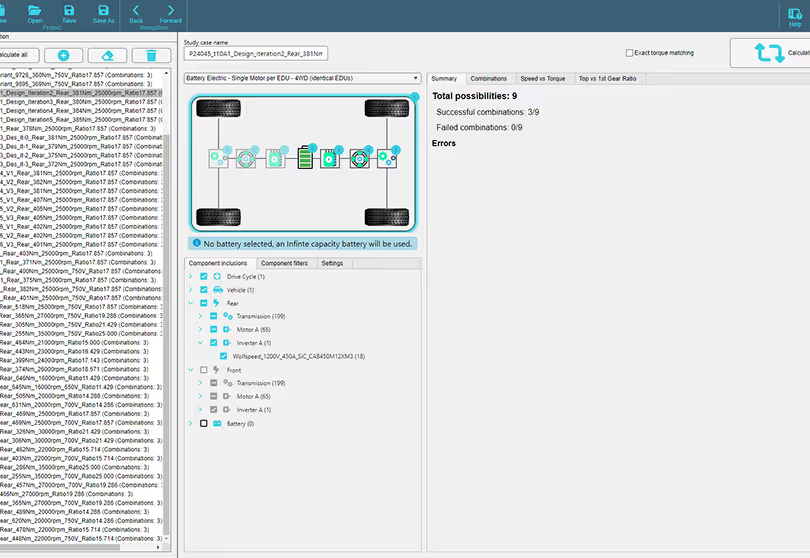
Added first of many 4WD powertrain architectures: BEV Single Motor 4WD (identical EDUs)
2/4/2024
2.0.0
Power Source Sizing
Core power source functionality added
2/4/2024
1.9.0
Pre-Processing
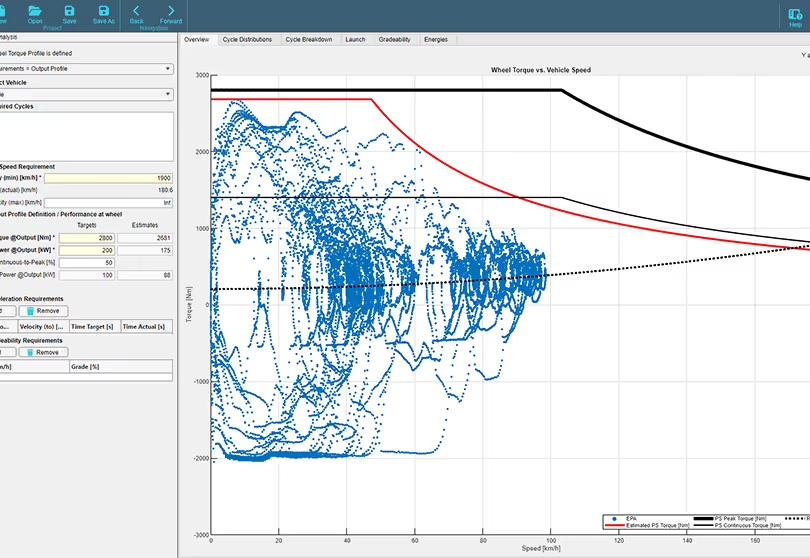
Enabled functionality to define cycle as outout torque/speed instead of vehicle definition + resistance
2/4/2024
1.9.0
Run Study
Input Split Parallel Hybrid configurable parameters added: Final Drive ratio and MG2 to Ring Gear ratio
2/4/2024
1.9.0
Run Study
Input Split Parallel Hybrid controller now auto-configured by power source parameters
2/4/2024
2.0.0
Requirements Analysis
Requirements Analysis Added
4/4/2024
1.9.1
Component generation
All Excel import functions now support variable size lookup vectors and maps defined as input. (MGEN: 2-DI maps must have odd number of torque breakpoints, assuming a zero torque value in middle of map)
4/4/2024
1.9.1
Run Study
Series Hybrids: ICE Optimal Operating Line now auto-generates from BSFC map in pre-processing
20/4/2024
4.3.0
Run Study
User interface improvements for easier navigation
25/5/2024
4.4.0
Run Study
New integration options for various data sources
30/6/2024
4.5.0
Documentation
Security updates and patch releases for version 4.5
1/7/2024
2.1.0
All
Limited functionality, significant UI/UX updates, parallel execution, study config updates, run study generates v1.9.5 compatible outputs
15/7/2024
4.6.0
Component generation
New user guides and documentation released
10/8/2024
4.7.0
Data Library
Data management tools enhancements in release 4.7
5/9/2024
4.8.0
Pre-Processing
Final release of version 4.8 scheduled for Q4 2026
14/10/2024
2.3.0
Data Library
Added new component type: Battery
14/10/2024
2.3.0
Data Library
Added new component type: Fuel
14/10/2024
2.3.0
Pre-Processing
Study cases UI overhaul
14/10/2024
2.3.0
Component generation
TGEN embedded NVH metric: Gear Contact Ratio
25/10/2024
2.4.0
Run Study
Series Hybrid control system embedded
20/1/2025
4.0.0
Post Processing
Performance optimizations for large data sets
28/3/2025
3.0.0
Component generation
Added Motor scaling UI (Active Length)
28/3/2025
3.0.0
Component generation
Add properties to torque converter initialise and disable add new
28/3/2025
3.0.0
Sustainability
Added Toxicity KPI
28/3/2025
3.0.0
Post Processing
Add signals into post processing for use of water and toxicity
28/3/2025
3.0.0
Documentation
Added Documentation Viewer and User Guides
28/3/2025
3.0.0
Pre-Processing
Add clone study case to context menu
28/3/2025
3.0.0
Pre-Processing
Animated recalculate button
28/3/2025
3.0.0
Data Library
Added ability to view Motor seeds
28/3/2025
3.0.0
Sustainability
Added application type to materials
28/3/2025
3.0.0
Sustainability
Added water use KPI
28/3/2025
3.0.0
Post Processing
CO2 Contribution Analysis tab added in viewer
28/3/2025
3.0.0
Post Processing
Allows user to adjust scatter plot limits manually
28/3/2025
3.0.0
Component generation
Clone data library item added
28/3/2025
3.0.0
Component generation
Cloning parts handles multi-select
28/3/2025
3.0.0
Component generation
Excel import/export functionality added for Materials
28/3/2025
3.0.0
Component generation
Drive Cycle excel import added
28/3/2025
3.0.0
Data Library
IGEN UI integrated
28/3/2025
3.0.0
All
Enable thread based parallel execution
28/3/2025
3.0.0
Pre-Processing
Inclusion tree changes
28/3/2025
3.0.0
Post Processing
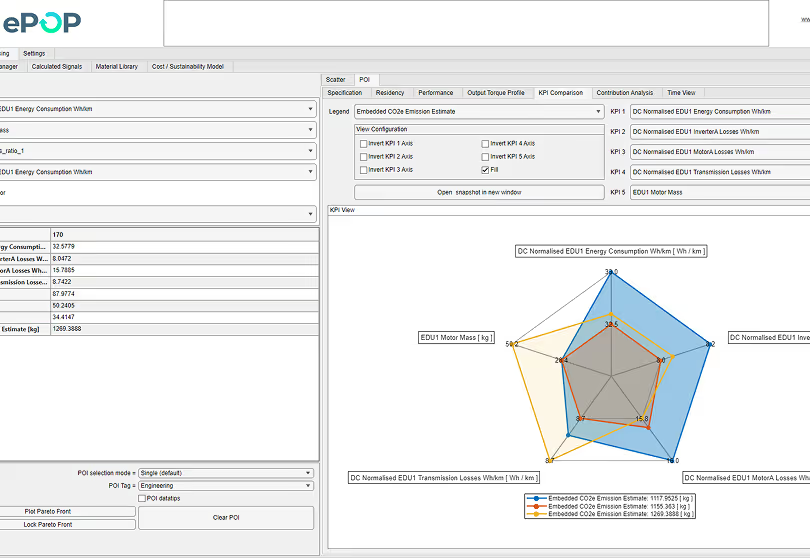
New calculated signals for edu1 mass and emissions. Split embedded and in-use co2e, added motor steel co2/kg input
28/3/2025
3.0.0
Pre-Processing
Study case - gray out cloned parts
28/3/2025
3.0.0
Post Processing
Spider plot legend at the bottom of viewer
28/3/2025
3.0.0
Run Study
PR 680: Add Output speed torque override to run study options
28/3/2025
3.0.0
Run Study
PR 726: Motor & Inverter matching now done in runtime
28/3/2025
3.0.0
Component generation
TGEN - Additional signals displaying in TGEN app
28/3/2025
3.0.0
Run Study
PR 705: Inverter Loss calculations updated & correlated against Semikron Application Note
28/3/2025
3.0.0
All
Power flow and study config images replaced
28/3/2025
3.0.0
Component generation
TGEN: Enable pinion tooth changing
28/3/2025
3.0.0
Component generation
TGEN: add single stage planetary and, enable pinion teeth editing, save some 1st stage data and display in UI
28/3/2025
3.0.0
Sustainability
Xls imports OS maps now support variable-size data inputs
28/3/2025
3.0.0
Post Processing
Viewer Output Torque Profile now has drop down selector for speed definition (kph/rpm)
28/3/2025
3.0.0
Post Processing
Viewer time view added under POI
28/3/2025
3.0.0
Post Processing
Viewer updated to allow axis limits to be set to manual or auto
28/3/2025
3.0.0
Component generation
Xls imports of maps now support variable size data inputs
15/4/2025
3.1.0
Requirements Analysis
New API endpoint for efficient data retrieval
10/5/2025
3.2.0
Run Study
Enhanced security features in release 3.2
1/6/2025
3.3.0
Pre-Processing
Improved user interface for better navigation
20/7/2025
3.4.0
Run Study
Bug fixes and performance enhancements in version 3.4
15/8/2025
3.5.0
Power Source Sizing
New reporting tools for advanced data analysis
10/9/2025
3.6.0
Requirements Analysis
Integration with third-party services for enhanced functionality
5/10/2025
3.7.0
Requirements Analysis
Mobile optimization for better user experience
1/11/2025
3.8.0
Documentation
New data visualization tools released in version 3.8
15/12/2025
3.9.0
Data Library
User feedback implemented in the latest release

No releases found for the selected filters.

Try adjusting the date, release, or category options.

...

FAQ

Learn more about ePOP

Still have questions?

Still looking for answers? Explore the full FAQ to learn more about ePOP.

Explore FAQ

1. Rapid design-space exploration – Optimised to evaluate thousands of powertrain variants in a single study, so teams can converge on the most promising architectures quickly.

2. Financial and sustainability KPIs alongside engineering performance – Lets you assess technical performance together with cost and sustainability drivers, making trade-offs explicit earlier in the decision process.

3. Fast concept part generation (eMotor, inverter, transmission) – Generate concept components from target specifications to estimate system impact without needing detailed designs upfront, bringing system-level analysis earlier and reducing reliance on specialist tools for early screening.

4. Motor-CAD import – Seamlessly import Motor-CAD motor designs into ePOP to evaluate them in a full system context (drive cycle, architecture trade-offs, overall efficiency).

5. Focused powertrain evaluation and reporting – Not a general-purpose simulation environment; it’s purpose-built for powertrain analysis, with tailored reporting that simplifies comparing concepts and communicating results.

ePOP simulates the full powertrain and reports efficiency at both the system level and the component level (e.g., inverter, e-motor, transmission), so you can clearly see where losses occur. Once improvement opportunities are identified, you can use ePOP’s component library to swap in alternative designs and re-run the system simulation to quantify the impact. If an off-the-shelf alternative isn’t available, ePOP’s component concepting modules let you rapidly generate new variants and evaluate their efficiency benefit in the same workflow.

ePOP is a high level system-level simulation environment. Components are represented using a combination of scalar parameters (to capture limits and key characteristics) and performance maps (to capture behaviour across an operating range). For example, an e-motor might be defined by scalars such as base speed and maximum torque, alongside maps such as efficiency versus speed and torque. This reduced order approach is commonly utilised in the simulation domain and is designed to evaluate many powertrain concepts quickly and support trade-off studies, rather than modelling a single powertrain in high geometric/physics detail.

The term "AI" captures a wide range of solutions and technical approaches. In the simulation domain, optimisation algorithms (a type of AI) have been in use for decades, and ePOP is no different when addressing the challenges of discrete optimisation. Another type of AI is Neural Networks, which can specifically be deployed to some benefit if there are large amount of static real world measurements available, to replace static physics based simulation. As ePOP (and all other simulation software) lack large amount of measurement data, and usually perform optimisation including time domain analysis, Neural Networks provide little/no benefit and are therefore not necessary in ePOP. The challenge of correlation to real world measurements is usually addressed by ISO standards, which do exactly that: fit analytical/empirical models onto real world measurement data. ePOP relies on ISO standards for engineering accuracy. And finally, the use of LLM's (large language models) to support future engineering workflows is an exciting area of AI development. We are all aware of the limitations of LLM systems when it comes to providing physics based answers to engineering questions. ePOP aims to support the agentic ecosystem by providing an MCP that LLM systems can utilise to increase the reliability of such workflows. Direct integration of LLM based workflow assistants and MCP servers is on the product roadmap.

ePOP Concept correlates to real-world applications through the use of power-versus-time duty cycles defined at the powertrain output, from which sub-component sizing is derived using first-principles power and energy analysis. The tool has been exercised using load profiles obtained from existing production applications. When the resulting component sizes are compared against the corresponding real-world hardware, the predicted sizing is typically within 10%. To balance limited data availability with computational speed, ePOP Concept employs zero-dimensional, physics-based models that capture the dominant system behaviors relevant to early-phase architecture decisions.

For analysis requiring a higher degree of freedom and time-domain fidelity, ZeBeyond’s other toolset ePOP Pro extends this approach using one-dimensional dynamic simulation incorporating efficiency maps and engine BSFC maps. ePOP Pro has been correlated against real-world measurement data to within <1% and has additionally been cross-validated against established industry-standard simulation environments such as GT-Suite.